

FAQ XolidoSign Desktop
When I sign with my ACA Plus certificate, I get a message asking me to install a trusted root certificate
If, when signing a document, you see a warning stating that the certificate you are trying to use was not issued by a trusted certificate authority, it may be because you do not have the ACA+ root certificate installed.
How to install the ACA+ root certificate
1. Download the ACA ROOT 2 root certificate.
2. Once downloaded, install the ACA ROOT 2 root certificate on your computer.
Administrator permissions are required.
To do this, right-click on the downloaded certificate “ACA_ROOTCA” and select “Install Certificate.”
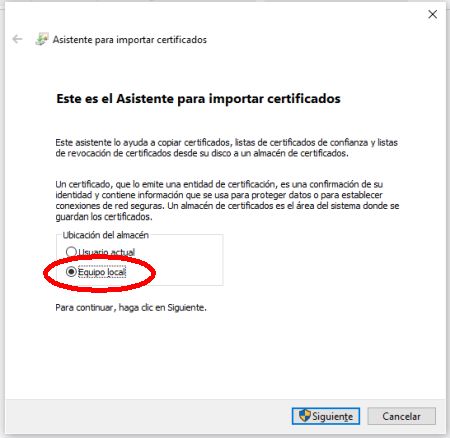
- Select “Local computer” and click Next.
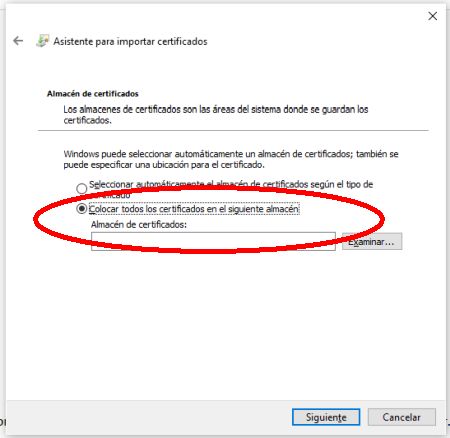
- Select “Place all certificates in the following store” and click Browse…
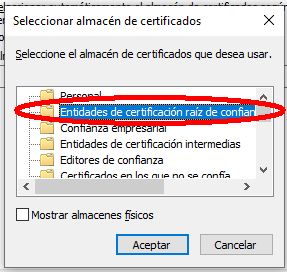
- Select “Trusted Root Certification Authorities” and click OK.
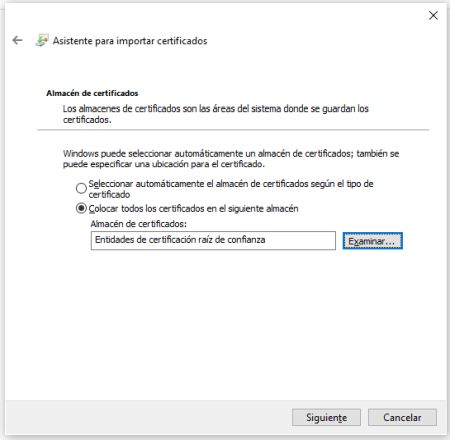
- Click Next.
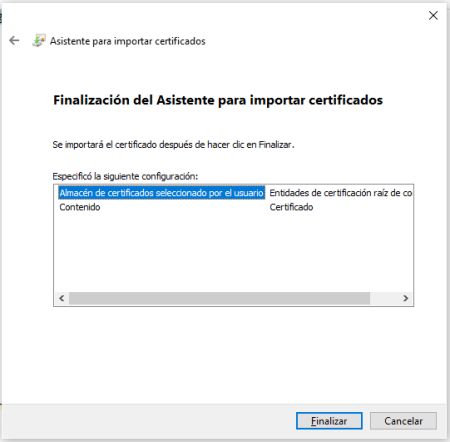
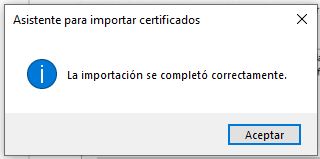
- Click Finish.
You can find more information on how to configure your ACA+ certificate at the following link: More info on ACA+

XolidoSign Solutions


Xolido products
IT infrastructure and cloud services
About us